

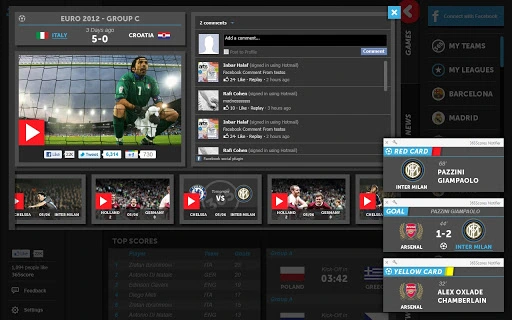
Description
Real-Time Sports Tracking for Fans
Overview
The 365scores App is designed for sports enthusiasts seeking immediate access to live scores, game updates, and multimedia content from their favorite teams. It aims to eliminate the need for constant web browsing by delivering real-time notifications directly to the desktop. The application supports a wide range of sports, including football, basketball, baseball, tennis, hockey, and others, enabling fans to stay informed regardless of their preferred sport. Its core purpose is to provide personalized, timely coverage so users can be the first to know about goals, match results, and breaking news.
Target users include casual fans, dedicated followers of multiple sports, and individuals who enjoy sharing game highlights and updates with friends on social platforms. The app is particularly useful for those who want to maintain a constant connection to live events without switching between multiple browser tabs or relying on fragmented news sources. Real-world usage scenarios include tracking a live football match during a work break, receiving instant alerts for a last-minute goal, or sharing a viral highlight video on Twitter or Facebook directly from the app.
Developed by 365scores, the application is positioned as a user-friendly, free tool that streamlines sports content delivery. While the developer’s background beyond the name is not specified, the app’s focus on real-time updates and social integration suggests a design centered on fan engagement and immediacy. The integration of notification systems and media sharing indicates a strong emphasis on user experience and community interaction.
Key Features & Capabilities
- Real-Time Notifications – Instant alerts for goals, match outcomes, and breaking news, ensuring users never miss a critical moment.
- Live Score Tracking – Continuous updates on ongoing games across multiple sports, providing accurate and up-to-date information.
- Live Video Clips – Access to short video highlights from key plays, allowing fans to relive exciting moments instantly.
- Social Media Integration – Direct sharing of scores, videos, and articles to platforms like Facebook and Twitter from within the application.
- Personalized Coverage – Users can select specific teams and sports to receive tailored updates and notifications.
- Multi-Sport Support – Comprehensive coverage for football, basketball, baseball, tennis, hockey, and other popular sports.
- Centralized Sports Dashboard – A unified interface to monitor multiple games, teams, and events simultaneously.
These features collectively support efficient monitoring of live events. For example, a user following both a Premier League football team and a NBA basketball team can receive real-time alerts for both leagues without switching between apps. The ability to share video clips directly from the app enhances community engagement, making it ideal for group discussions or fan-based social interactions. Personalized coverage ensures that users are not overwhelmed by irrelevant content, improving focus and usability.
User Interface, Workflow & Performance
The user interface is structured around a clean, intuitive layout designed for quick access to key information. Navigation is likely streamlined, allowing users to switch between sports, teams, and live events with minimal effort. The workflow begins with a brief setup process to select preferred teams and notification preferences, after which the app operates in the background with minimal user input.
Based on the described functionality, the app is expected to maintain a responsive interface even during high-traffic events such as major tournaments or live matches. However, exact performance details were not specified. The developer did not provide additional system requirements, so resource usage such as CPU or RAM behavior remains unspecified. Stability is assumed to be consistent with typical desktop applications of this nature, though real-world behavior may vary based on system configuration and network conditions.
General performance observations are based on standard patterns for real-time notification-based software. The app likely operates efficiently when idle and scales appropriately during live events. Users should expect minimal lag during updates, especially when notifications are triggered. The integration of social sharing suggests a focus on usability, with features designed to be accessible even to non-technical users.
Compatibility & System Requirements
The 365scores App is compatible with Windows and Mac operating systems, making it accessible to a broad range of desktop users. The developer has not specified the exact version requirements for each OS, nor has the installation size been provided. As such, compatibility details beyond the listed platforms are not available.
Exact system requirements were not listed. The developer did not specify minimum hardware specifications such as processor speed, RAM, or storage space needed for optimal operation. Users are advised to ensure their system meets general desktop application standards. Installation and configuration are described as brief, suggesting a straightforward process suitable for most users.
Pros and Cons
Pros
- Free to use with no hidden costs
- Real-time notifications for live events and breaking news
- Supports multiple sports and customizable team tracking
- Integrated social sharing for instant updates on Facebook and Twitter
- Simple setup and user-friendly interface
- Access to live video clips and multimedia content
- Available for both Windows and Mac users
Cons
- Exact system requirements were not specified
- Performance behavior under heavy load is not documented
- No information on offline functionality
- Resource usage (CPU/RAM) not disclosed
- Version number and update frequency not provided
FAQ Section
Is 365scores App compatible with my Windows or Mac system?
The app is designed for both Windows and Mac operating systems. Specific version compatibility was not listed by the developer.
Can I use 365scores without an internet connection?
Given the real-time nature of the app’s features, offline usage is unlikely. The application requires an active internet connection to deliver live scores and notifications.
Is the app safe to download and install?
The app is distributed as a free desktop tool from the official developer, 365scores. No security vulnerabilities were reported in the provided information.
How often does the app update?
Update frequency was not specified. Users are advised to check for updates manually or rely on automatic checks if available.
What kind of license does 365scores use?
The app is offered as a free tool with no licensing fees. The developer did not provide details on usage rights or restrictions.
Final Thoughts + CTA
The 365scores App delivers a focused, real-time sports tracking experience tailored to fans who value immediacy and engagement. Its ability to deliver live scores, video clips, and breaking news directly to the desktop, combined with seamless social sharing, makes it a valuable tool for sports enthusiasts across multiple disciplines. The free model and cross-platform availability further enhance its accessibility.
While some technical details such as system requirements and performance metrics are not disclosed, the app’s core functionality aligns with the needs of modern sports fans. Users seeking a centralized, personalized dashboard for live sports content will find this tool effective and efficient.
Download 365scores App now and stay ahead of the game with instant updates and real-time sharing.
Guides & Tutorials for 365Scores App for Chrome
How to install 365Scores App for Chrome
- Click the Preview / Download button above.
- Once redirected, accept the terms and click Install.
- Wait for the 365Scores App for Chrome download to finish on your device.
How to use 365Scores App for Chrome
This software is primarily used for its core features described above. Open the app after installation to explore its capabilities.
User Reviews for 365Scores App for Chrome 0
No reviews found





